Feature Request: Preset Dropdown Menus for Model Settings and Prompts
To streamline workflow and improve efficiency, I propose adding two dropdown menus to access and load saved presets within the application:
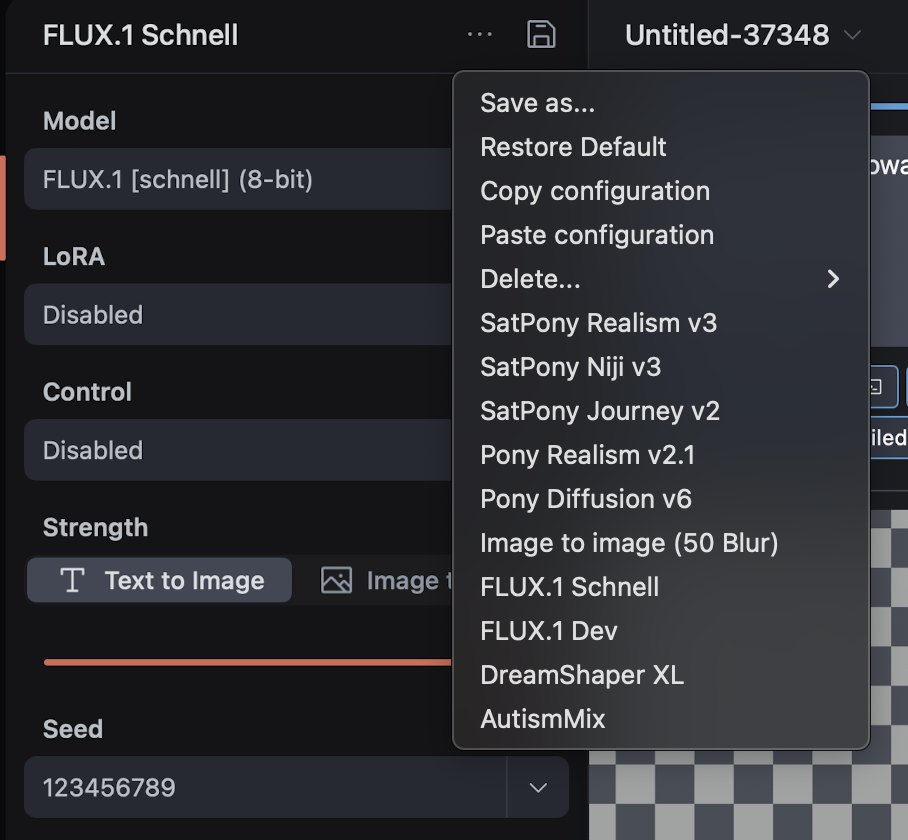
1. Model Preset Dropdown: A dropdown menu where users can select from previously saved, user-customizable model presets. Each preset would load the corresponding model along with its specific settings, such as LoRAs, embeddings, CFG, steps, sampler, etc. Users would be able to customize and save these configurations according to their preferences, allowing for quick switching between models (e.g., between "Pony" and "SDXL") without manually adjusting all related settings each time. By selecting a preset, all associated parameters would be automatically configured to match the optimal settings for that model.
2. Prompt Preset Dropdown: A separate dropdown menu dedicated to saving and loading positive and negative prompt presets. This would enable users to efficiently apply frequently used prompts without having to retype or manually insert them.
This feature is inspired by the implementation in the DrawThings app for Mac, which already provides a similar capability. Incorporating these dropdown menus would greatly enhance the user experience by making it easier to manage and switch between different models and their respective configurations.
Please authenticate to join the conversation.
Awaiting Dev Review
💡 Feature Request
Over 1 year ago

Q96
Subscribe to post
Get notified by email when there are changes.
Awaiting Dev Review
💡 Feature Request
Over 1 year ago
Q96
Subscribe to post
Get notified by email when there are changes.